





 Upcoming Events
 Event Series
 On-Demand Events



When you're hiring hundreds of interns across multiple practice areas and locations, creating meaningful connections becomes really tricky. Traditional virtual recruiting events often feel like one-size-fits-all experiences where students sit through sessions that may not relate to their interests or career goals.
A global consulting firm faced exactly this challenge. With five distinct business segments, dozens of practice areas, and 1,000+ event attendees, they needed a way to let students forge their own path while still providing structured networking opportunities. This playbook shows exactly how they used Goldcast's booths and rooms feature to create personalized and engaging experiences.
What You'll Learn
- How to map your business structure to Goldcast's booth and room system
- Strategies for creating multiple booth configurations based on event goals
Expected Results
- Seamless navigation for attendees
- Higher attendee satisfaction rates compared to traditional virtual events
Step 1: Map Your Structure to Goldcast Booths
The first smart move was mapping their existing business structure directly onto Goldcast's booth system.
Here's how they set it up:
- Each of their five business segments got its own dedicated booth
- Within each segment booth, they created 1-2 rooms per practice area
- They labeled those booths and rooms to match their internal language
For example, one business segment had multiple practice areas within it. Students interested in that segment could click into the booth and see all the different practice rooms available. If they wanted to learn about a specific practice area, they could jump into that room and chat directly with professionals who work in that practice.
💡 Pro tip: While Goldcast's booth feature is typically designed for external sponsors, this company got really creative and repurposed it to organize their own business segments. This gives attendees a clear navigation structure. Don't be afraid to think outside the box with platform features!
Step 2: Create Multiple Booth Configurations for Different Networking Goals
This company didn't just use one booth approach for every event. Instead, they adapted their booth strategy based on the specific goals of each recruiting event.
For their flagship recruiting event: They stuck with their practice-based setup with booths organized by business segment and rooms for each practice area. This worked perfectly because students were there to learn about different career paths and find the right fit for their interests and skills.
For their virtual intern orientation: Since this event had different networking goals, they created two different booth setups:
- Practice-based networking: Booths organized by business segment and practice area
- Location-based networking: Booths organized by geographic location
During their orientation, they literally switched from the practice-based setup to the location-based setup between days. Students could network based on their career interests on day one, then connect with other interns in their same city on day two.
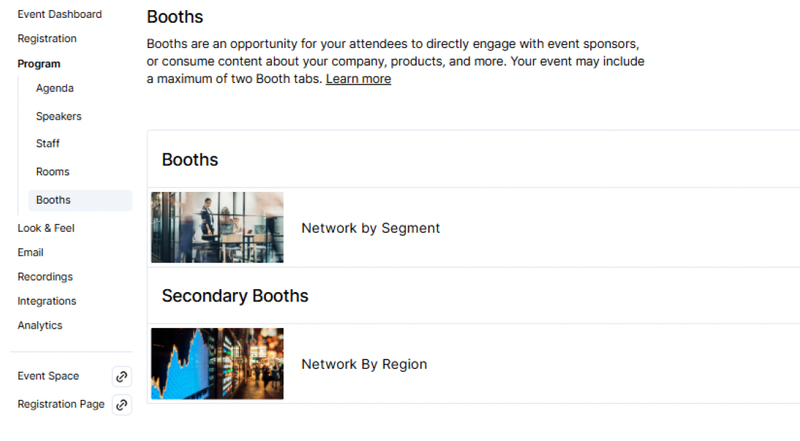
💡 Pro tip: You can set up these secondary configurations on the back end, turn them off initially, then switch them on mid-event. Think about your event goals and whether one configuration serves the entire event, or if switching between setups would create more value for different networking moments.
Step 3: Train Your Team Using the Actual Platform
This is probably the most overlooked part of virtual event success, and this company absolutely nailed it. Instead of trying to explain how Goldcast worked over a screen share, they actually hosted their business volunteer training session inside Goldcast itself.
What their training included:
- ~400 business volunteers got hands-on experience with the platform before the real event
- Volunteers practiced moving between booths and finding their assigned rooms
- They tested cameras, uploaded profiles, and got comfortable with the interface
- The training was recorded so people who missed it could still watch and get up to speed
The result: Complete crickets in their volunteer support chat during the actual event. No "I got kicked out" messages, no spinning wheel complaints, nothing. Compare that to previous years where their group chat was constantly buzzing with technical questions and issues.
Results
The numbers speak for themselves:
- 1,000+ students attended across their virtual recruiting events
- ~400 business volunteers participated without technical issues
- 97% candidate satisfaction (42% increase from the previous year)
- 91% business volunteer satisfaction (71% jump from the previous year)
But beyond the numbers, this consulting firm achieved something even more valuable: they gave students control over their own experience. Instead of forcing everyone through the same generic sessions and networking, students could choose their own path based on their interests, background, and career goals.
When you give people the tools to create their own experience, everyone wins. Students get more relevant conversations, volunteers feel more prepared and confident, and your recruiting team actually achieves their goals instead of just hoping for the best.
Build Better Networking Experiences
See how easy it is to create engaging and personalized experiences